[phpBB Debug] PHP Warning: in file [ROOT]/includes/bbcode.php on line 483: preg_replace(): The /e modifier is no longer supported, use preg_replace_callback instead
[phpBB Debug] PHP Warning: in file [ROOT]/includes/bbcode.php on line 483: preg_replace(): The /e modifier is no longer supported, use preg_replace_callback instead
[phpBB Debug] PHP Warning: in file [ROOT]/includes/bbcode.php on line 483: preg_replace(): The /e modifier is no longer supported, use preg_replace_callback instead
[phpBB Debug] PHP Warning: in file [ROOT]/includes/bbcode.php on line 483: preg_replace(): The /e modifier is no longer supported, use preg_replace_callback instead
[phpBB Debug] PHP Warning: in file [ROOT]/includes/bbcode.php on line 483: preg_replace(): The /e modifier is no longer supported, use preg_replace_callback instead
[phpBB Debug] PHP Warning: in file [ROOT]/includes/bbcode.php on line 483: preg_replace(): The /e modifier is no longer supported, use preg_replace_callback instead
[phpBB Debug] PHP Warning: in file [ROOT]/includes/bbcode.php on line 483: preg_replace(): The /e modifier is no longer supported, use preg_replace_callback instead
[phpBB Debug] PHP Warning: in file [ROOT]/includes/bbcode.php on line 483: preg_replace(): The /e modifier is no longer supported, use preg_replace_callback instead
[phpBB Debug] PHP Warning: in file [ROOT]/includes/bbcode.php on line 483: preg_replace(): The /e modifier is no longer supported, use preg_replace_callback instead
[phpBB Debug] PHP Warning: in file [ROOT]/includes/bbcode.php on line 483: preg_replace(): The /e modifier is no longer supported, use preg_replace_callback instead
[phpBB Debug] PHP Warning: in file [ROOT]/includes/bbcode.php on line 483: preg_replace(): The /e modifier is no longer supported, use preg_replace_callback instead
[phpBB Debug] PHP Warning: in file [ROOT]/includes/bbcode.php on line 483: preg_replace(): The /e modifier is no longer supported, use preg_replace_callback instead
[phpBB Debug] PHP Warning: in file [ROOT]/includes/bbcode.php on line 483: preg_replace(): The /e modifier is no longer supported, use preg_replace_callback instead
[phpBB Debug] PHP Warning: in file [ROOT]/includes/bbcode.php on line 483: preg_replace(): The /e modifier is no longer supported, use preg_replace_callback instead
[phpBB Debug] PHP Warning: in file [ROOT]/includes/bbcode.php on line 483: preg_replace(): The /e modifier is no longer supported, use preg_replace_callback instead
[phpBB Debug] PHP Warning: in file [ROOT]/includes/bbcode.php on line 483: preg_replace(): The /e modifier is no longer supported, use preg_replace_callback instead
[phpBB Debug] PHP Warning: in file [ROOT]/includes/bbcode.php on line 483: preg_replace(): The /e modifier is no longer supported, use preg_replace_callback instead
[phpBB Debug] PHP Warning: in file [ROOT]/includes/bbcode.php on line 483: preg_replace(): The /e modifier is no longer supported, use preg_replace_callback instead
[phpBB Debug] PHP Warning: in file [ROOT]/includes/bbcode.php on line 483: preg_replace(): The /e modifier is no longer supported, use preg_replace_callback instead
[phpBB Debug] PHP Warning: in file [ROOT]/includes/bbcode.php on line 483: preg_replace(): The /e modifier is no longer supported, use preg_replace_callback instead
[phpBB Debug] PHP Warning: in file [ROOT]/includes/bbcode.php on line 483: preg_replace(): The /e modifier is no longer supported, use preg_replace_callback instead
[phpBB Debug] PHP Warning: in file [ROOT]/includes/bbcode.php on line 483: preg_replace(): The /e modifier is no longer supported, use preg_replace_callback instead
[phpBB Debug] PHP Warning: in file [ROOT]/includes/bbcode.php on line 483: preg_replace(): The /e modifier is no longer supported, use preg_replace_callback instead
[phpBB Debug] PHP Warning: in file [ROOT]/includes/bbcode.php on line 483: preg_replace(): The /e modifier is no longer supported, use preg_replace_callback instead
[phpBB Debug] PHP Warning: in file [ROOT]/includes/bbcode.php on line 483: preg_replace(): The /e modifier is no longer supported, use preg_replace_callback instead
[phpBB Debug] PHP Warning: in file [ROOT]/includes/bbcode.php on line 483: preg_replace(): The /e modifier is no longer supported, use preg_replace_callback instead
[phpBB Debug] PHP Warning: in file [ROOT]/includes/bbcode.php on line 112: preg_replace(): The /e modifier is no longer supported, use preg_replace_callback instead
[phpBB Debug] PHP Warning: in file [ROOT]/includes/bbcode.php on line 112: preg_replace(): The /e modifier is no longer supported, use preg_replace_callback instead
[phpBB Debug] PHP Warning: in file [ROOT]/feed.php on line 173: Cannot modify header information - headers already sent by (output started at [ROOT]/includes/functions.php:3906)
[phpBB Debug] PHP Warning: in file [ROOT]/feed.php on line 174: Cannot modify header information - headers already sent by (output started at [ROOT]/includes/functions.php:3906)
Skyline Forums Skyline Game Engine Community Forums 2012-11-20T10:43:27+01:00 https://forum.aurasoft-skyline.co.uk/feed.php?f=35&t=89 2012-11-20T10:43:27+01:00 2012-11-20T10:43:27+01:00 https://forum.aurasoft-skyline.co.uk/viewtopic.php?t=89&p=329#p329 <![CDATA[Re: How to connect lua script to my game object?]]> Statistics: Posted by StarFire — 20 Nov 2012, 10:43


]]>
2012-11-20T01:04:56+01:00 2012-11-20T01:04:56+01:00 https://forum.aurasoft-skyline.co.uk/viewtopic.php?t=89&p=326#p326 <![CDATA[Re: How to connect lua script to my game object?]]> Statistics: Posted by Ellement — 20 Nov 2012, 01:04


]]>
2012-11-20T00:25:37+01:00 2012-11-20T00:25:37+01:00 https://forum.aurasoft-skyline.co.uk/viewtopic.php?t=89&p=320#p320 <![CDATA[Re: How to connect lua script to my game object?]]>

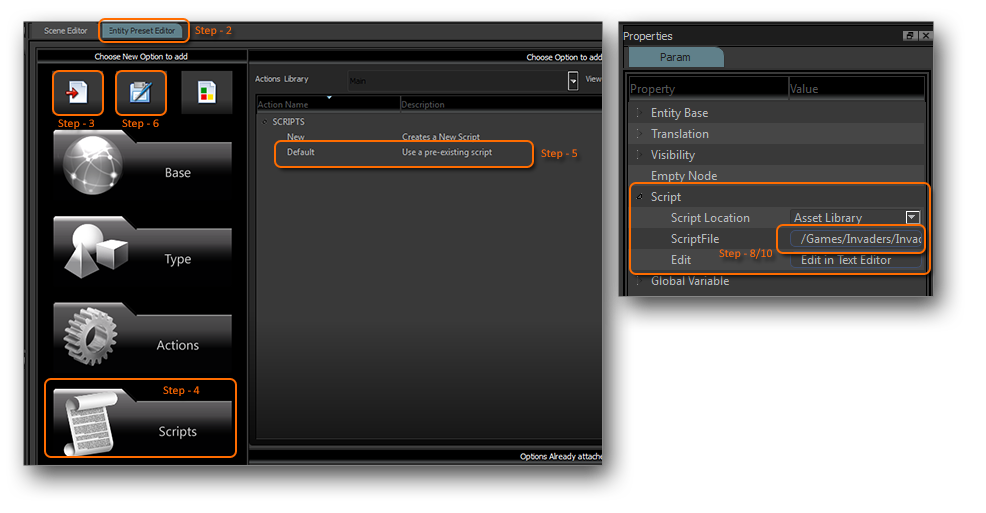
1) select your object in the scene list.
2) open the Entity Preset Editor
3) press the top left button "Edit Scene Entity" to get the entity data into the editor
4) click on the big button "Scripts" to open the scripts
5) Add a default script
6) Press the top center save button to save the data back into the scene
7) Click on the scene entity again in the scene list
8) From this scene entities property open the script header and select the script file button You will notice that the default script is showing.
9) Head to the asset library/Scripts folder and duplicate the Default.lua script, as this will give you some basic event functions.
10) repeat step 8 but this time click and select your newly duplicated file.
Image

Hope this helps ;)

Statistics: Posted by StarFire — 20 Nov 2012, 00:25


]]>
2012-11-20T00:00:23+01:00 2012-11-20T00:00:23+01:00 https://forum.aurasoft-skyline.co.uk/viewtopic.php?t=89&p=311#p311 <![CDATA[How to connect lua script to my game object? [SOLVED]]]> Statistics: Posted by Ellement — 20 Nov 2012, 00:00


]]>