Also reduced the terrain loading speed from 5 seconds to 2-3 seconds on a 1024x1024 terrain resolution

Chipping away at the remaining jobs now

Statistics: Posted by SolarPortal — 09 Mar 2017, 23:50
]]>
The system while trying to make a few things at different rez's has shown a couple of bugs which i am diving in to fix as we speak
So not long now til a release of the terrain system to Gen2 users Statistics: Posted by SolarPortal — 21 Feb 2017, 18:18
]]>
Statistics: Posted by SolarPortal — 18 Feb 2017, 20:34
]]>
]]>
Clipboard Image.jpg
This is the terrain from the Gen1 tech demo: Island road from the environment folder.
The textures applied to this terrain are not the ones from the demo as i havent done that section yet, but what we do have is the ability to grab the height data, blending data, colourmap data, global normal data and the lightmap data. The last 2 arent working properly yet.
Edit: Global normals are now working
Simple pixel format error.Being able to load Gen1 scenes is of huge importance to us so any level made on Gen1 will port over to Gen2 to make it as quick as possible to get going again
Statistics: Posted by SolarPortal — 18 Feb 2017, 18:25
]]>
]]>
]]>
As promised to all users, here is the up to date information on where we are with the terrain. So pop over to the blog and have a good read:
TerrainFeature2017.png
Statistics: Posted by SolarPortal — 12 Feb 2017, 16:50
]]>
]]>
]]>
]]>
]]>
]]>
]]>
Normals are not normal maps, but normal maps require normals/tangents which is why you have several variations of blue in a normal map texture which indicates at a texture level what the normal at that point on the texture is which is why you see a bumpy surface in the engine. So Normals indicate whether the object is lit or in shade and the normal maps add surface normal variation to the face to alter the lighting to create the illusion of a bumpy surface.
Normals can be calculated simply by creating a line perpendicular to the face that it is being generated for. This is done by averaging several vertex positions to get the normals angle.
Here's a sample pic of a normal:
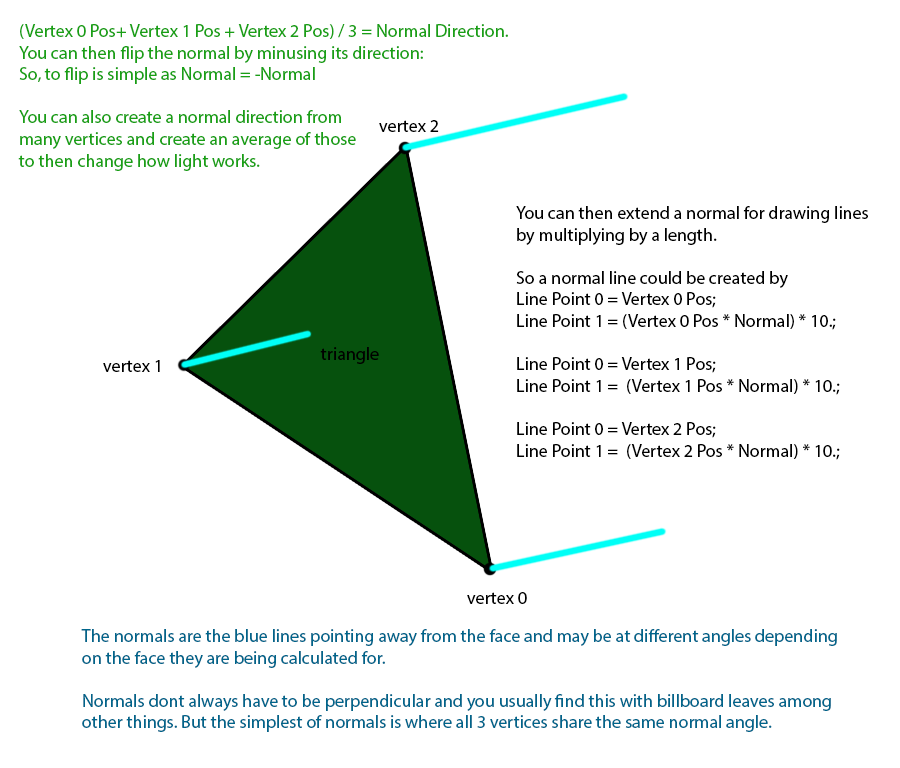
Now i mentioned Tangents in there also; these are similar to normals but work at adjacent angles of say 45 degrees to add extra information that can be read by shaders to do more. Binormals are a cross product of the normal and tangent which fills the TBN Matrix(Tangent, Binornal, Normal)
I could probably explain them better with more time, but i think you will get the gist of it.
One of the Gpu Gems books contain this information in more detail.
Statistics: Posted by SolarPortal — 19 Nov 2016, 16:57
]]>