[phpBB Debug] PHP Warning: in file [ROOT]/includes/bbcode.php on line 483: preg_replace(): The /e modifier is no longer supported, use preg_replace_callback instead
[phpBB Debug] PHP Warning: in file [ROOT]/includes/bbcode.php on line 483: preg_replace(): The /e modifier is no longer supported, use preg_replace_callback instead
[phpBB Debug] PHP Warning: in file [ROOT]/includes/bbcode.php on line 483: preg_replace(): The /e modifier is no longer supported, use preg_replace_callback instead
[phpBB Debug] PHP Warning: in file [ROOT]/includes/bbcode.php on line 483: preg_replace(): The /e modifier is no longer supported, use preg_replace_callback instead
[phpBB Debug] PHP Warning: in file [ROOT]/includes/bbcode.php on line 483: preg_replace(): The /e modifier is no longer supported, use preg_replace_callback instead
[phpBB Debug] PHP Warning: in file [ROOT]/includes/bbcode.php on line 483: preg_replace(): The /e modifier is no longer supported, use preg_replace_callback instead
[phpBB Debug] PHP Warning: in file [ROOT]/includes/bbcode.php on line 483: preg_replace(): The /e modifier is no longer supported, use preg_replace_callback instead
[phpBB Debug] PHP Warning: in file [ROOT]/includes/bbcode.php on line 483: preg_replace(): The /e modifier is no longer supported, use preg_replace_callback instead
[phpBB Debug] PHP Warning: in file [ROOT]/includes/bbcode.php on line 483: preg_replace(): The /e modifier is no longer supported, use preg_replace_callback instead
[phpBB Debug] PHP Warning: in file [ROOT]/includes/bbcode.php on line 483: preg_replace(): The /e modifier is no longer supported, use preg_replace_callback instead
[phpBB Debug] PHP Warning: in file [ROOT]/includes/bbcode.php on line 483: preg_replace(): The /e modifier is no longer supported, use preg_replace_callback instead
[phpBB Debug] PHP Warning: in file [ROOT]/includes/bbcode.php on line 483: preg_replace(): The /e modifier is no longer supported, use preg_replace_callback instead
[phpBB Debug] PHP Warning: in file [ROOT]/includes/bbcode.php on line 483: preg_replace(): The /e modifier is no longer supported, use preg_replace_callback instead
[phpBB Debug] PHP Warning: in file [ROOT]/includes/bbcode.php on line 483: preg_replace(): The /e modifier is no longer supported, use preg_replace_callback instead
[phpBB Debug] PHP Warning: in file [ROOT]/includes/bbcode.php on line 483: preg_replace(): The /e modifier is no longer supported, use preg_replace_callback instead
[phpBB Debug] PHP Warning: in file [ROOT]/includes/bbcode.php on line 483: preg_replace(): The /e modifier is no longer supported, use preg_replace_callback instead
[phpBB Debug] PHP Warning: in file [ROOT]/includes/bbcode.php on line 483: preg_replace(): The /e modifier is no longer supported, use preg_replace_callback instead
[phpBB Debug] PHP Warning: in file [ROOT]/includes/bbcode.php on line 483: preg_replace(): The /e modifier is no longer supported, use preg_replace_callback instead
[phpBB Debug] PHP Warning: in file [ROOT]/includes/bbcode.php on line 483: preg_replace(): The /e modifier is no longer supported, use preg_replace_callback instead
[phpBB Debug] PHP Warning: in file [ROOT]/includes/bbcode.php on line 483: preg_replace(): The /e modifier is no longer supported, use preg_replace_callback instead
[phpBB Debug] PHP Warning: in file [ROOT]/includes/bbcode.php on line 483: preg_replace(): The /e modifier is no longer supported, use preg_replace_callback instead
[phpBB Debug] PHP Warning: in file [ROOT]/includes/bbcode.php on line 483: preg_replace(): The /e modifier is no longer supported, use preg_replace_callback instead
[phpBB Debug] PHP Warning: in file [ROOT]/includes/bbcode.php on line 483: preg_replace(): The /e modifier is no longer supported, use preg_replace_callback instead
[phpBB Debug] PHP Warning: in file [ROOT]/includes/bbcode.php on line 483: preg_replace(): The /e modifier is no longer supported, use preg_replace_callback instead
[phpBB Debug] PHP Warning: in file [ROOT]/includes/bbcode.php on line 483: preg_replace(): The /e modifier is no longer supported, use preg_replace_callback instead
[phpBB Debug] PHP Warning: in file [ROOT]/includes/bbcode.php on line 483: preg_replace(): The /e modifier is no longer supported, use preg_replace_callback instead
[phpBB Debug] PHP Warning: in file [ROOT]/includes/bbcode.php on line 112: preg_replace(): The /e modifier is no longer supported, use preg_replace_callback instead
[phpBB Debug] PHP Warning: in file [ROOT]/includes/bbcode.php on line 112: preg_replace(): The /e modifier is no longer supported, use preg_replace_callback instead
[phpBB Debug] PHP Warning: in file [ROOT]/includes/bbcode.php on line 112: preg_replace(): The /e modifier is no longer supported, use preg_replace_callback instead
[phpBB Debug] PHP Warning: in file [ROOT]/includes/bbcode.php on line 112: preg_replace(): The /e modifier is no longer supported, use preg_replace_callback instead
[phpBB Debug] PHP Warning: in file [ROOT]/includes/functions.php on line 4771: Cannot modify header information - headers already sent by (output started at [ROOT]/includes/functions.php:3906)
[phpBB Debug] PHP Warning: in file [ROOT]/includes/functions.php on line 4773: Cannot modify header information - headers already sent by (output started at [ROOT]/includes/functions.php:3906)
[phpBB Debug] PHP Warning: in file [ROOT]/includes/functions.php on line 4774: Cannot modify header information - headers already sent by (output started at [ROOT]/includes/functions.php:3906)
[phpBB Debug] PHP Warning: in file [ROOT]/includes/functions.php on line 4775: Cannot modify header information - headers already sent by (output started at [ROOT]/includes/functions.php:3906)
Skyline Forums • View topic - Blender Exporting and Animation
The place to post mesh,and animation related hints and problems.

Blender Exporting and Animation

Blender Exporting and Animation

Postby necdel » 14 Dec 2012, 05:05

Ok, I am no artists, but I created a tentacle monster in Sculptris, imported to blender, made rigging, did an animation, and exported it with blender2ogre. I did get an error with the exporter, something about OGRE not supporting vertices being on more than 4 bones. No clue how to fix this or anything yet, so not even sure if the animations will work in the engine. However, my mesh imported successfully into the engine, albeit rotated 90 degrees on the X axis. I believe this is an issue with the blender plugin though. From reading the other posts here, is there no way to define what frames my animations are on at the moment?

Just seen in the documentation that you guys weren't sure about the blender2ogre thing working for the engine yet. Thought I would go ahead and take the initiative to try and get it tested. It appears that it will work fine, for someone who knows a bit more about what they are doing with models and animations hah.

I can upload the blender file if anyone would like, or the files it exported. I only have like 5 hours of work total on the model (literally first mob model I have done myself). I was upset at first when i realized my monster had 60k vertices at first, had to go back and got it down to 3800, loosing all my time making it look nice in Sculptris :D

Here is a pic of it imported to the engine.

Image
necdel
Skyline Apprentice
 
Posts: 20
Joined: 13 Dec 2012, 16:05

Re: Blender Exporting and Animation

Postby StarFire » 14 Dec 2012, 09:52

User avatar
StarFire
Skyline Founder
Skyline Founder
 
Posts: 1678
Joined: 03 Jan 2012, 18:50
Location: UK
Skill: Great creative
Skill: Programmer
Skill: 3D Modeller
Skill: 2D Artist
Skill: Level Designer

Re: Blender Exporting and Animation

Postby StarFire » 14 Dec 2012, 17:40

Vortex has kindly found another exporter that may work for your export.

viewtopic.php?f=5&t=133&p=571#p571
User avatar
StarFire
Skyline Founder
Skyline Founder
 
Posts: 1678
Joined: 03 Jan 2012, 18:50
Location: UK
Skill: Great creative
Skill: Programmer
Skill: 3D Modeller
Skill: 2D Artist
Skill: Level Designer

Re: Blender Exporting and Animation

Postby necdel » 14 Dec 2012, 18:42

necdel
Skyline Apprentice
 
Posts: 20
Joined: 13 Dec 2012, 16:05

Re: Blender Exporting and Animation

Postby StarFire » 14 Dec 2012, 20:04

User avatar
StarFire
Skyline Founder
Skyline Founder
 
Posts: 1678
Joined: 03 Jan 2012, 18:50
Location: UK
Skill: Great creative
Skill: Programmer
Skill: 3D Modeller
Skill: 2D Artist
Skill: Level Designer

Re: Blender Exporting and Animation

Postby necdel » 14 Dec 2012, 23:39

Awesome! So I did a new model today, kept the high poly around this time. Figured out how to do normal maps, texture, and all that jazz. So this is what I have ended up with so far.

Image
Image

Looks so much better with that normal map, thanks for that. I did give the other Ogre exporter a try that you mentioned, it did not work for me, it kept erroring out in blender. I went back and used the original one blender2ogre and set the -y like you suggested, it imported perfect into the engine, except my material isnt showing up. I am sure the material issue is on my side and not the engine. Will keep this thread updated until I get everything imported with animation.

*EDIT*

Ok the material imports fine... I didnt have it in the same folder with the model! Animation time now.
necdel
Skyline Apprentice
 
Posts: 20
Joined: 13 Dec 2012, 16:05

Re: Blender Exporting and Animation

Postby SolarPortal » 15 Dec 2012, 09:44

cool, looks like it is going well :D
i look forward to the results
User avatar
SolarPortal
Skyline Founder
Skyline Founder
 
Posts: 3631
Joined: 29 Jul 2012, 15:56
Location: UK
Skill: 3D Modeller
Skill: 2D Artist
Skill: Programmer
Skill: Level Designer

Re: Blender Exporting and Animation

Postby necdel » 15 Dec 2012, 10:02

necdel
Skyline Apprentice
 
Posts: 20
Joined: 13 Dec 2012, 16:05

Re: Blender Exporting and Animation

Postby SolarPortal » 15 Dec 2012, 10:26

finally blender to skyline has been solved. Thanks very much for all the information :D

To Get normal maps and higher specular, you can use the material editor to achieve this.
See this Doc: https://learn.aurasoft-skyline.co.uk/doku.php ... rialeditor

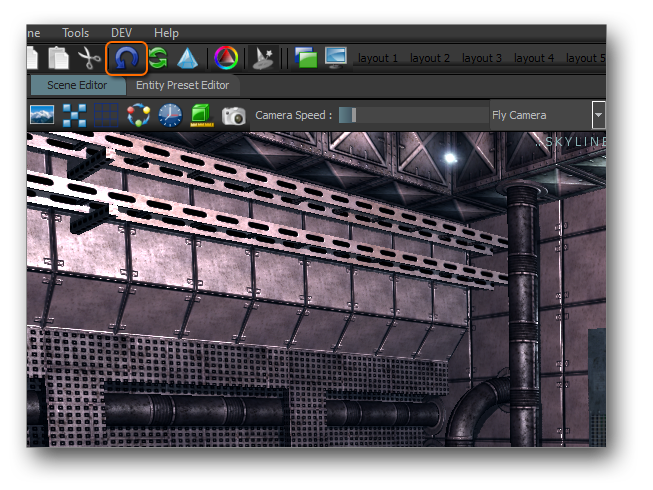
When working with skyline, you can quickly update your Model/Materials/Shaders/Textures in the scene without closing down by pressing this button with a SceneEntity Selected:
Image
This is part of the Rapid Prototyping system that we are building for skyline.

All Assets the community creates is welcome, as we want skyline users to have something to play with in the engine without having to create their own until needed.

Good work ;)
User avatar
SolarPortal
Skyline Founder
Skyline Founder
 
Posts: 3631
Joined: 29 Jul 2012, 15:56
Location: UK
Skill: 3D Modeller
Skill: 2D Artist
Skill: Programmer
Skill: Level Designer

Re: Блендера и Экспорт Анимации

Postby ant0N » 15 Dec 2012, 10:47

using the FBX will greatly facilitate our work... look at how to integrate FBX in Gamestart3D http://gamestart3d.com/wiki/index.php?t ... _GameStart
User avatar
ant0N
Skyline Moderator
Skyline Moderator
 
Posts: 415
Joined: 02 Nov 2012, 12:49
Location: Россия, Москва
Skill: Programmer
Skill: 3D Modeller


Return to Mesh + Animation

Who is online

Users browsing this forum: No registered users and 8 guests