
[phpBB Debug] PHP Warning: in file [ROOT]/includes/bbcode.php on line 483: preg_replace(): The /e modifier is no longer supported, use preg_replace_callback instead
[phpBB Debug] PHP Warning: in file [ROOT]/includes/bbcode.php on line 483: preg_replace(): The /e modifier is no longer supported, use preg_replace_callback instead
[phpBB Debug] PHP Warning: in file [ROOT]/includes/bbcode.php on line 483: preg_replace(): The /e modifier is no longer supported, use preg_replace_callback instead
[phpBB Debug] PHP Warning: in file [ROOT]/includes/bbcode.php on line 483: preg_replace(): The /e modifier is no longer supported, use preg_replace_callback instead
[phpBB Debug] PHP Warning: in file [ROOT]/includes/bbcode.php on line 483: preg_replace(): The /e modifier is no longer supported, use preg_replace_callback instead
[phpBB Debug] PHP Warning: in file [ROOT]/includes/bbcode.php on line 483: preg_replace(): The /e modifier is no longer supported, use preg_replace_callback instead
[phpBB Debug] PHP Warning: in file [ROOT]/includes/bbcode.php on line 483: preg_replace(): The /e modifier is no longer supported, use preg_replace_callback instead
[phpBB Debug] PHP Warning: in file [ROOT]/includes/bbcode.php on line 483: preg_replace(): The /e modifier is no longer supported, use preg_replace_callback instead
[phpBB Debug] PHP Warning: in file [ROOT]/includes/bbcode.php on line 483: preg_replace(): The /e modifier is no longer supported, use preg_replace_callback instead
[phpBB Debug] PHP Warning: in file [ROOT]/includes/bbcode.php on line 483: preg_replace(): The /e modifier is no longer supported, use preg_replace_callback instead
[phpBB Debug] PHP Warning: in file [ROOT]/includes/bbcode.php on line 483: preg_replace(): The /e modifier is no longer supported, use preg_replace_callback instead
[phpBB Debug] PHP Warning: in file [ROOT]/includes/bbcode.php on line 483: preg_replace(): The /e modifier is no longer supported, use preg_replace_callback instead
[phpBB Debug] PHP Warning: in file [ROOT]/includes/bbcode.php on line 483: preg_replace(): The /e modifier is no longer supported, use preg_replace_callback instead
[phpBB Debug] PHP Warning: in file [ROOT]/includes/bbcode.php on line 483: preg_replace(): The /e modifier is no longer supported, use preg_replace_callback instead
[phpBB Debug] PHP Warning: in file [ROOT]/includes/bbcode.php on line 483: preg_replace(): The /e modifier is no longer supported, use preg_replace_callback instead
[phpBB Debug] PHP Warning: in file [ROOT]/includes/bbcode.php on line 483: preg_replace(): The /e modifier is no longer supported, use preg_replace_callback instead
[phpBB Debug] PHP Warning: in file [ROOT]/includes/bbcode.php on line 483: preg_replace(): The /e modifier is no longer supported, use preg_replace_callback instead
[phpBB Debug] PHP Warning: in file [ROOT]/includes/bbcode.php on line 483: preg_replace(): The /e modifier is no longer supported, use preg_replace_callback instead
[phpBB Debug] PHP Warning: in file [ROOT]/includes/bbcode.php on line 483: preg_replace(): The /e modifier is no longer supported, use preg_replace_callback instead
[phpBB Debug] PHP Warning: in file [ROOT]/includes/bbcode.php on line 483: preg_replace(): The /e modifier is no longer supported, use preg_replace_callback instead
[phpBB Debug] PHP Warning: in file [ROOT]/includes/bbcode.php on line 483: preg_replace(): The /e modifier is no longer supported, use preg_replace_callback instead
[phpBB Debug] PHP Warning: in file [ROOT]/includes/bbcode.php on line 483: preg_replace(): The /e modifier is no longer supported, use preg_replace_callback instead
[phpBB Debug] PHP Warning: in file [ROOT]/includes/bbcode.php on line 483: preg_replace(): The /e modifier is no longer supported, use preg_replace_callback instead
[phpBB Debug] PHP Warning: in file [ROOT]/includes/bbcode.php on line 483: preg_replace(): The /e modifier is no longer supported, use preg_replace_callback instead
[phpBB Debug] PHP Warning: in file [ROOT]/includes/bbcode.php on line 483: preg_replace(): The /e modifier is no longer supported, use preg_replace_callback instead
[phpBB Debug] PHP Warning: in file [ROOT]/includes/bbcode.php on line 483: preg_replace(): The /e modifier is no longer supported, use preg_replace_callback instead
[phpBB Debug] PHP Warning: in file [ROOT]/includes/bbcode.php on line 112: preg_replace(): The /e modifier is no longer supported, use preg_replace_callback instead
[phpBB Debug] PHP Warning: in file [ROOT]/includes/bbcode.php on line 112: preg_replace(): The /e modifier is no longer supported, use preg_replace_callback instead
[phpBB Debug] PHP Warning: in file [ROOT]/includes/functions.php on line 4771: Cannot modify header information - headers already sent by (output started at [ROOT]/includes/functions.php:3906)
[phpBB Debug] PHP Warning: in file [ROOT]/includes/functions.php on line 4773: Cannot modify header information - headers already sent by (output started at [ROOT]/includes/functions.php:3906)
[phpBB Debug] PHP Warning: in file [ROOT]/includes/functions.php on line 4774: Cannot modify header information - headers already sent by (output started at [ROOT]/includes/functions.php:3906)
[phpBB Debug] PHP Warning: in file [ROOT]/includes/functions.php on line 4775: Cannot modify header information - headers already sent by (output started at [ROOT]/includes/functions.php:3906)
Skyline Forums • View topic - Editor 3D View requests
For any feature requests to either the Skyline Engine or the websites and forums please leave your suggestion here.

Editor 3D View requests

Editor 3D View requests

Postby SpiderMack » 25 Sep 2017, 22:07

Hi,

I have some requests about the 3D View to ease working in the editor, the firsts ones are the more important.

1) Shift + RMB down and mouse move to pan the view (like many other 3D) software

2) Perspectove and Orthogonal camera switching icon or key function
Orthogonal view is incredibly usefull to precisely place 3D objects in space instead of moving camera in all sides

3) Quick icon or key to move camera directly near the selected object in the scene or object selected in the scene entity list

4) Small Gizmo to quickly switch between perspective or top, down, sides views, it's very usefull when needing to do precise placement.
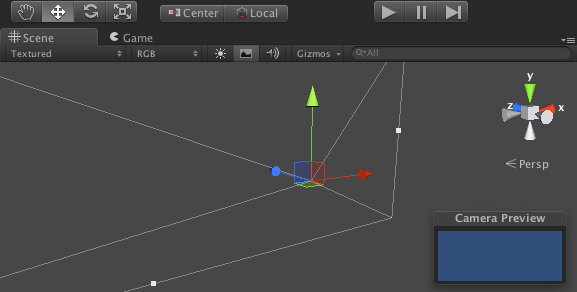
Image

5) Press space to switch between move , rotate and scale object functions (Unreal like).
Sometimes a key press to cycle between tools is faster than move and click with mouse.

User avatar
SpiderMack
Skyline Expert
 
Posts: 441
Joined: 02 Dec 2016, 09:15
Skill: Concept artist
Skill: 3D Modeller
Skill: Level Designer
Skill: Scripter

Re: Editor 3D View requests

Postby SolarPortal » 26 Sep 2017, 09:51

Attachments
Clipboard Image (2).jpg
Clipboard Image (2).jpg (17.34 KiB) Viewed 20315 times


Twitter:
Instagram:
User avatar
SolarPortal
Skyline Founder
Skyline Founder
 
Posts: 3631
Joined: 29 Jul 2012, 15:56
Location: UK
Skill: 3D Modeller
Skill: 2D Artist
Skill: Programmer
Skill: Level Designer

Re: Editor 3D View requests

Postby SpiderMack » 26 Sep 2017, 10:12

User avatar
SpiderMack
Skyline Expert
 
Posts: 441
Joined: 02 Dec 2016, 09:15
Skill: Concept artist
Skill: 3D Modeller
Skill: Level Designer
Skill: Scripter

Re: Editor 3D View requests

Postby SolarPortal » 26 Sep 2017, 10:19

Thanks for the input on the middle mouse button.

we never liked it ourselves because our mouse button was crap on our equipment in the studio, but a key input manager is planned, but again.. no timeline on this due to the main release :)


Twitter:
Instagram:
User avatar
SolarPortal
Skyline Founder
Skyline Founder
 
Posts: 3631
Joined: 29 Jul 2012, 15:56
Location: UK
Skill: 3D Modeller
Skill: 2D Artist
Skill: Programmer
Skill: Level Designer

Re: Editor 3D View requests

Postby SpiderMack » 26 Sep 2017, 10:20

I had another editor request :

In rotation gizmo mode : CTRL + mouse to make 45° rotations
It's something very usefull to quickly turn objects in main directions.
User avatar
SpiderMack
Skyline Expert
 
Posts: 441
Joined: 02 Dec 2016, 09:15
Skill: Concept artist
Skill: 3D Modeller
Skill: Level Designer
Skill: Scripter

Re: Editor 3D View requests

Postby SolarPortal » 26 Sep 2017, 10:26

you can engage 45 degree rotations by using this property in the menu:
Clipboard Image (2).jpg
Clipboard Image (2).jpg (24.69 KiB) Viewed 20307 times


Twitter:
Instagram:
User avatar
SolarPortal
Skyline Founder
Skyline Founder
 
Posts: 3631
Joined: 29 Jul 2012, 15:56
Location: UK
Skill: 3D Modeller
Skill: 2D Artist
Skill: Programmer
Skill: Level Designer

Re: Editor 3D View requests

Postby SpiderMack » 26 Sep 2017, 18:54

I like the snapping tool

Image

And the construction kit and auto placement is great and works in combination with snap feature, i think i can extend it with my own 3D tiles :D
User avatar
SpiderMack
Skyline Expert
 
Posts: 441
Joined: 02 Dec 2016, 09:15
Skill: Concept artist
Skill: 3D Modeller
Skill: Level Designer
Skill: Scripter


Return to Feature Requests

Who is online

Users browsing this forum: No registered users and 6 guests

