[phpBB Debug] PHP Warning: in file [ROOT]/includes/bbcode.php on line 483: preg_replace(): The /e modifier is no longer supported, use preg_replace_callback instead
[phpBB Debug] PHP Warning: in file [ROOT]/includes/bbcode.php on line 483: preg_replace(): The /e modifier is no longer supported, use preg_replace_callback instead
[phpBB Debug] PHP Warning: in file [ROOT]/includes/bbcode.php on line 483: preg_replace(): The /e modifier is no longer supported, use preg_replace_callback instead
[phpBB Debug] PHP Warning: in file [ROOT]/includes/bbcode.php on line 483: preg_replace(): The /e modifier is no longer supported, use preg_replace_callback instead
[phpBB Debug] PHP Warning: in file [ROOT]/includes/bbcode.php on line 483: preg_replace(): The /e modifier is no longer supported, use preg_replace_callback instead
[phpBB Debug] PHP Warning: in file [ROOT]/includes/bbcode.php on line 483: preg_replace(): The /e modifier is no longer supported, use preg_replace_callback instead
[phpBB Debug] PHP Warning: in file [ROOT]/includes/bbcode.php on line 483: preg_replace(): The /e modifier is no longer supported, use preg_replace_callback instead
[phpBB Debug] PHP Warning: in file [ROOT]/includes/bbcode.php on line 483: preg_replace(): The /e modifier is no longer supported, use preg_replace_callback instead
[phpBB Debug] PHP Warning: in file [ROOT]/includes/bbcode.php on line 483: preg_replace(): The /e modifier is no longer supported, use preg_replace_callback instead
[phpBB Debug] PHP Warning: in file [ROOT]/includes/bbcode.php on line 483: preg_replace(): The /e modifier is no longer supported, use preg_replace_callback instead
[phpBB Debug] PHP Warning: in file [ROOT]/includes/bbcode.php on line 483: preg_replace(): The /e modifier is no longer supported, use preg_replace_callback instead
[phpBB Debug] PHP Warning: in file [ROOT]/includes/bbcode.php on line 483: preg_replace(): The /e modifier is no longer supported, use preg_replace_callback instead
[phpBB Debug] PHP Warning: in file [ROOT]/includes/bbcode.php on line 483: preg_replace(): The /e modifier is no longer supported, use preg_replace_callback instead
[phpBB Debug] PHP Warning: in file [ROOT]/includes/bbcode.php on line 483: preg_replace(): The /e modifier is no longer supported, use preg_replace_callback instead
[phpBB Debug] PHP Warning: in file [ROOT]/includes/bbcode.php on line 483: preg_replace(): The /e modifier is no longer supported, use preg_replace_callback instead
[phpBB Debug] PHP Warning: in file [ROOT]/includes/bbcode.php on line 483: preg_replace(): The /e modifier is no longer supported, use preg_replace_callback instead
[phpBB Debug] PHP Warning: in file [ROOT]/includes/bbcode.php on line 483: preg_replace(): The /e modifier is no longer supported, use preg_replace_callback instead
[phpBB Debug] PHP Warning: in file [ROOT]/includes/bbcode.php on line 483: preg_replace(): The /e modifier is no longer supported, use preg_replace_callback instead
[phpBB Debug] PHP Warning: in file [ROOT]/includes/bbcode.php on line 483: preg_replace(): The /e modifier is no longer supported, use preg_replace_callback instead
[phpBB Debug] PHP Warning: in file [ROOT]/includes/bbcode.php on line 483: preg_replace(): The /e modifier is no longer supported, use preg_replace_callback instead
[phpBB Debug] PHP Warning: in file [ROOT]/includes/bbcode.php on line 483: preg_replace(): The /e modifier is no longer supported, use preg_replace_callback instead
[phpBB Debug] PHP Warning: in file [ROOT]/includes/bbcode.php on line 483: preg_replace(): The /e modifier is no longer supported, use preg_replace_callback instead
[phpBB Debug] PHP Warning: in file [ROOT]/includes/bbcode.php on line 483: preg_replace(): The /e modifier is no longer supported, use preg_replace_callback instead
[phpBB Debug] PHP Warning: in file [ROOT]/includes/bbcode.php on line 483: preg_replace(): The /e modifier is no longer supported, use preg_replace_callback instead
[phpBB Debug] PHP Warning: in file [ROOT]/includes/bbcode.php on line 483: preg_replace(): The /e modifier is no longer supported, use preg_replace_callback instead
[phpBB Debug] PHP Warning: in file [ROOT]/includes/bbcode.php on line 483: preg_replace(): The /e modifier is no longer supported, use preg_replace_callback instead
[phpBB Debug] PHP Warning: in file [ROOT]/includes/bbcode.php on line 379: preg_replace(): The /e modifier is no longer supported, use preg_replace_callback instead
[phpBB Debug] PHP Warning: in file [ROOT]/includes/bbcode.php on line 112: preg_replace(): The /e modifier is no longer supported, use preg_replace_callback instead
[phpBB Debug] PHP Warning: in file [ROOT]/includes/bbcode.php on line 112: preg_replace(): The /e modifier is no longer supported, use preg_replace_callback instead
[phpBB Debug] PHP Warning: in file [ROOT]/includes/bbcode.php on line 112: preg_replace(): The /e modifier is no longer supported, use preg_replace_callback instead
[phpBB Debug] PHP Warning: in file [ROOT]/includes/bbcode.php on line 112: preg_replace(): The /e modifier is no longer supported, use preg_replace_callback instead
[phpBB Debug] PHP Warning: in file [ROOT]/includes/bbcode.php on line 112: preg_replace(): The /e modifier is no longer supported, use preg_replace_callback instead
[phpBB Debug] PHP Warning: in file [ROOT]/includes/bbcode.php on line 112: preg_replace(): The /e modifier is no longer supported, use preg_replace_callback instead
[phpBB Debug] PHP Warning: in file [ROOT]/includes/functions.php on line 4771: Cannot modify header information - headers already sent by (output started at [ROOT]/includes/functions.php:3906)
[phpBB Debug] PHP Warning: in file [ROOT]/includes/functions.php on line 4773: Cannot modify header information - headers already sent by (output started at [ROOT]/includes/functions.php:3906)
[phpBB Debug] PHP Warning: in file [ROOT]/includes/functions.php on line 4774: Cannot modify header information - headers already sent by (output started at [ROOT]/includes/functions.php:3906)
[phpBB Debug] PHP Warning: in file [ROOT]/includes/functions.php on line 4775: Cannot modify header information - headers already sent by (output started at [ROOT]/includes/functions.php:3906)
Skyline Forums • View topic - Need physics size adjusting and shortucts
For any feature requests to either the Skyline Engine or the websites and forums please leave your suggestion here.

Need physics size adjusting and shortucts

Need physics size adjusting and shortucts

Postby SpiderMack » 04 Dec 2016, 12:30

You can't adjust caspule height and diameter ?
Image
Last edited by SpiderMack on 04 Dec 2016, 13:01, edited 1 time in total.
User avatar
SpiderMack
Skyline Expert
 
Posts: 441
Joined: 02 Dec 2016, 09:15
Skill: Concept artist
Skill: 3D Modeller
Skill: Level Designer
Skill: Scripter

Delete Actions key shortcut

Postby SpiderMack » 04 Dec 2016, 12:35

Select entity Action or Lua in "Properties", press "Delete" key to remove the Action.
Faster, no need to open Action Editor :)
User avatar
SpiderMack
Skyline Expert
 
Posts: 441
Joined: 02 Dec 2016, 09:15
Skill: Concept artist
Skill: 3D Modeller
Skill: Level Designer
Skill: Scripter

Editor Camera quick views

Postby SpiderMack » 04 Dec 2016, 13:00

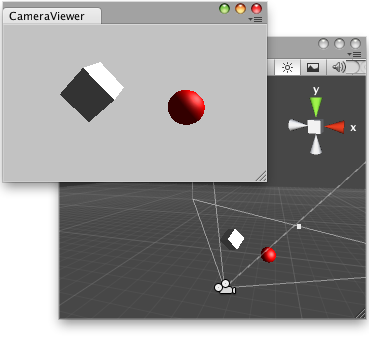
Need to quickly access views like Unity do with gizmo Arrows and cube.
It's too long to adjust objects positions moving camera around left, right, top, front, back, down.

Image
User avatar
SpiderMack
Skyline Expert
 
Posts: 441
Joined: 02 Dec 2016, 09:15
Skill: Concept artist
Skill: 3D Modeller
Skill: Level Designer
Skill: Scripter

Re: Need physics size adjusting and shortucts

Postby SolarPortal » 04 Dec 2016, 13:07

That looks like a capsule rigidbody, for characters try adding a Simple Character controller action which has full adjustments.
If you use the Player character controller, then you can wander around with your character pretty quickly, but has limited options whereas the SCC is open ended by using scripting to expand what your character can do.
Use the character.library() in lua to control this action.

As for the action delete speedup... valid idea :D

Pointing a camera at a source is quite awkward, and we were going to add a handle to the camera which you could position to where you want to look.
As for the different angles like front, back, top, bottom, back.. This is similar to 3dsmax with their cube. We do have the options in the last block on the top right bar in the overlay of the scene, you can change between the different angles but is slow to get to, plus with the current camera errors, we are unsure if it would work as expected.


Twitter:
Instagram:
User avatar
SolarPortal
Skyline Founder
Skyline Founder
 
Posts: 3631
Joined: 29 Jul 2012, 15:56
Location: UK
Skill: 3D Modeller
Skill: 2D Artist
Skill: Programmer
Skill: Level Designer

Re: Need physics size adjusting and shortucts

Postby SpiderMack » 04 Dec 2016, 13:18

User avatar
SpiderMack
Skyline Expert
 
Posts: 441
Joined: 02 Dec 2016, 09:15
Skill: Concept artist
Skill: 3D Modeller
Skill: Level Designer
Skill: Scripter

Re: Need physics size adjusting and shortucts

Postby SpiderMack » 04 Dec 2016, 13:26

User avatar
SpiderMack
Skyline Expert
 
Posts: 441
Joined: 02 Dec 2016, 09:15
Skill: Concept artist
Skill: 3D Modeller
Skill: Level Designer
Skill: Scripter

Re: Need physics size adjusting and shortucts

Postby SolarPortal » 04 Dec 2016, 13:31

The rigidbody action does not have adjustable sizes. what it does is takes the bounds and radius of the object and creates a hull based on that scale. This usually works fine for simpler shapes, but we can understand your issues with a capsule on a static object as we just gave it go.

May i ask what you trying to apply the capsule too mesh wise and why? These are times we usually just use convex hull or worse ........... mesh physics .. :shock: :shock: .. dun dun dun!!!!


Twitter:
Instagram:
User avatar
SolarPortal
Skyline Founder
Skyline Founder
 
Posts: 3631
Joined: 29 Jul 2012, 15:56
Location: UK
Skill: 3D Modeller
Skill: 2D Artist
Skill: Programmer
Skill: Level Designer

Re: Need physics size adjusting and shortucts

Postby SpiderMack » 04 Dec 2016, 13:35

You have some detailled model where shape looks like capsule, auto detect mesh size and bounds is not what you want sometimes, sometimes need to adjust manually and more precise capsule size and radius.
why can't override automatic size detection and tweak it manually for Rigid bodies ? don't make sense.

You need fast physics.
Image

What is convex ? What it does ? Can we tell how many polygons we want for convex collision ?
User avatar
SpiderMack
Skyline Expert
 
Posts: 441
Joined: 02 Dec 2016, 09:15
Skill: Concept artist
Skill: 3D Modeller
Skill: Level Designer
Skill: Scripter

Re: Need physics size adjusting and shortucts

Postby SolarPortal » 04 Dec 2016, 13:44

What you are showing there is what is known as compound shapes where you use multiple shapes to create one physics actor.
We have been wanting an editor for this for ages, but it has been a low priority as many didnt need it for their purposes.
Again, it can be added to the list and planned into the dev cycle.

Convex hull will wrap the object in the lowest polys possible but as the name suggests, it can only create faces that are convexed on the model and will skip all concaved surfaces.

The link you gave me yesterday to the mesh decomposition shows an example of the convex hull physics compared to the mesh decomp.


Twitter:
Instagram:
User avatar
SolarPortal
Skyline Founder
Skyline Founder
 
Posts: 3631
Joined: 29 Jul 2012, 15:56
Location: UK
Skill: 3D Modeller
Skill: 2D Artist
Skill: Programmer
Skill: Level Designer

Re: Need physics size adjusting and shortucts

Postby SpiderMack » 04 Dec 2016, 13:49

User avatar
SpiderMack
Skyline Expert
 
Posts: 441
Joined: 02 Dec 2016, 09:15
Skill: Concept artist
Skill: 3D Modeller
Skill: Level Designer
Skill: Scripter

Re: Need physics size adjusting and shortucts

Postby SolarPortal » 04 Dec 2016, 14:04

When we mean low priority, we mean that our userbase has not required it as most of modders/ hobbyists that enjoy working the software and the simple physics is all they have needed up til now. However, it doesnt mean the feature you suggest is not important for full game design,just that is hasnt been required yet! :D

leave it with us and we will see what we can do :D


Twitter:
Instagram:
User avatar
SolarPortal
Skyline Founder
Skyline Founder
 
Posts: 3631
Joined: 29 Jul 2012, 15:56
Location: UK
Skill: 3D Modeller
Skill: 2D Artist
Skill: Programmer
Skill: Level Designer

Re: Need physics size adjusting and shortucts

Postby SpiderMack » 04 Dec 2016, 14:12

User avatar
SpiderMack
Skyline Expert
 
Posts: 441
Joined: 02 Dec 2016, 09:15
Skill: Concept artist
Skill: 3D Modeller
Skill: Level Designer
Skill: Scripter

Re: Need physics size adjusting and shortucts

Postby SolarPortal » 04 Dec 2016, 16:19


Twitter:
Instagram:
User avatar
SolarPortal
Skyline Founder
Skyline Founder
 
Posts: 3631
Joined: 29 Jul 2012, 15:56
Location: UK
Skill: 3D Modeller
Skill: 2D Artist
Skill: Programmer
Skill: Level Designer

Re: Need physics size adjusting and shortucts

Postby SpiderMack » 04 Dec 2016, 16:45

30 minutes to tweak manually values and test a character physix capsule collider in Skyline, 1 minute in Unity workflow to get it right.
3:40 collison edit

User avatar
SpiderMack
Skyline Expert
 
Posts: 441
Joined: 02 Dec 2016, 09:15
Skill: Concept artist
Skill: 3D Modeller
Skill: Level Designer
Skill: Scripter

Re: Need physics size adjusting and shortucts

Postby planetX » 04 Dec 2016, 19:22

planetX
Skyline Contributor
Skyline Contributor
 
Posts: 210
Joined: 28 Nov 2016, 18:27
Skill: 3D Modeller
Skill: Level Designer
Skill: Concept artist
Skill: Great creative
Skill: Programmer

Re: Need physics size adjusting and shortucts

Postby TattieBoJangle » 04 Dec 2016, 19:40

A lot of it is just taking your time and getting to know the engine as you can get a character in and fully working in a few min ;)
User avatar
TattieBoJangle
Community Manager
Community Manager
 
Posts: 858
Joined: 26 Jan 2015, 00:15
Location: United Kingdom
Skill: 3D Modeller
Skill: 2D Artist
Skill: Level Designer
Skill: Great creative

Re: Need physics size adjusting and shortucts

Postby epsilonion » 04 Dec 2016, 21:17

I have to agree with the guys on this one, a few mins is all that is needed to get a character in and tweaked but then again I am used to the work flow.
Skyline Help:

User avatar
epsilonion
Skyline Lead Moderator
 
Posts: 874
Joined: 26 Feb 2015, 11:51
Location: Hull, East Yorkshire, England
Skill: Business Manager
Skill: Great creative


Return to Feature Requests

Who is online

Users browsing this forum: No registered users and 12 guests

cron